How do you keep AI-generated images on brand?

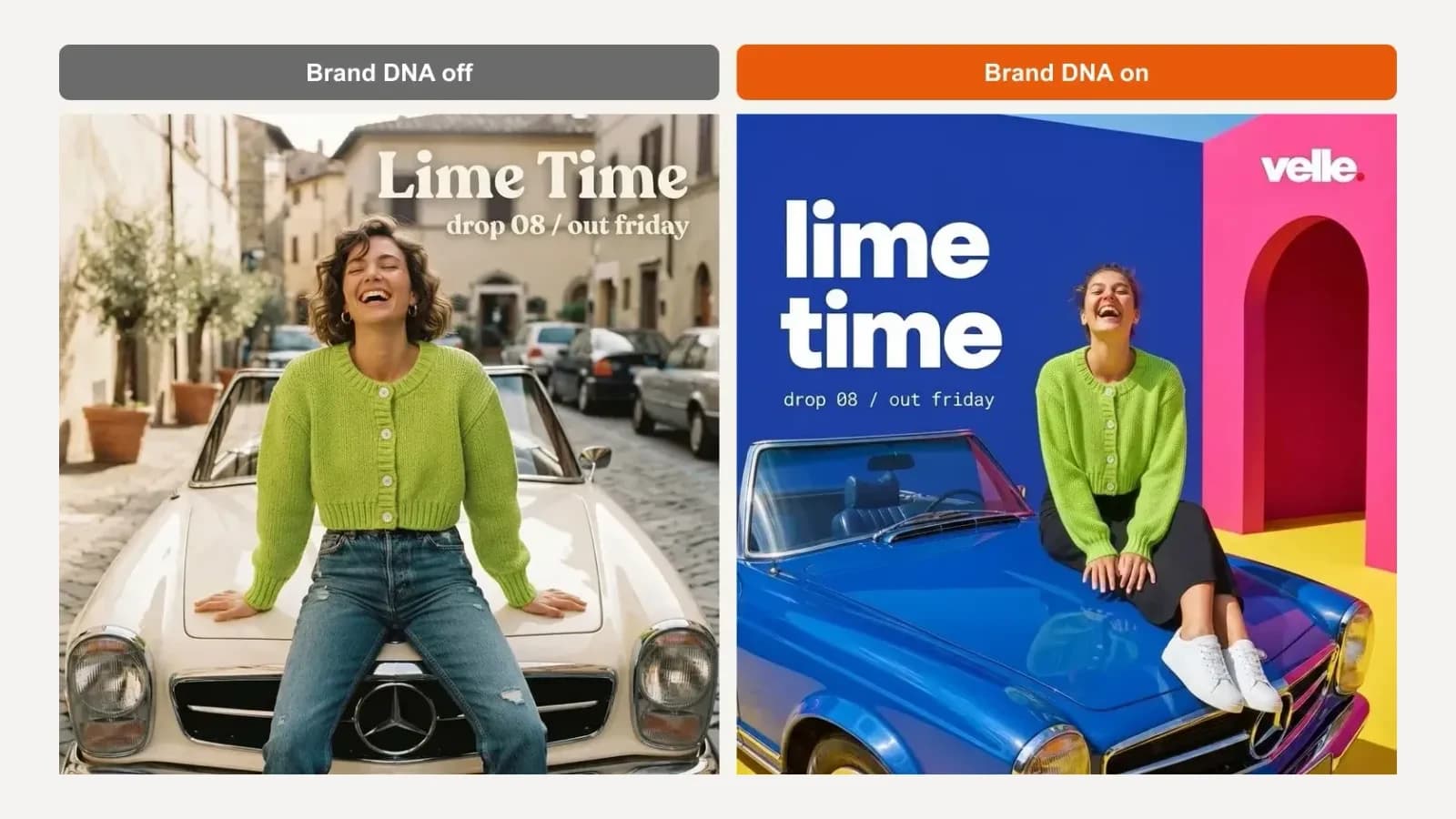
To keep AI-generated images on brand, give the AI a fixed brand spec that it applies to every image, keep your prompts about the subject rather than the style, attach your real logo and products, and check each image before it goes out. Without a spec, every prompt starts from the model's own default look.
Below we ran the same three prompts twice for one brand, once with its Brand DNA off and once with it on, so you can see exactly what changes.
Key takeaways
- Off-brand images are the default, not a bug: each prompt starts from the model's own idea of what looks good.
- A brand spec saved once beats describing your style in every prompt.
- Prompts should say what is in the image; the spec should decide how it looks.
- Give the AI your real logo and attach your real product, or the model invents them.
- Check people, products and every word before posting. One quick refine fixes most problems.
Why do AI images drift off brand?
Because nothing tells the model what your brand looks like. Each prompt is interpreted from scratch, so the model fills every gap (light, colour, type, setting) with its own defaults, and those defaults change from one image to the next.
You can see it in the left-hand images on this page. Asked for a fashion post, the model produced a sunny Italian street with a serif headline. Asked for a launch post, a seaside rooftop with brush lettering. Asked for a pop-up poster, a New York shopfront. Each is fine on its own, and none of them look like the same brand.
It gets worse with details the prompt does not mention. With no brand context, our pop-up poster came back with a made-up shop name, a made-up street address, and "Grand Opening" and "Opening Soon" on the same image.
What are the ways to keep AI images on brand?
There are four common approaches, and they trade effort for consistency.
1. Describe the style in every prompt. Free and works anywhere, but long prompts drift: "bold, colourful, modern" means something different on every run, and nobody on the team writes it the same way twice.
Got any questions left?
Keep every AI image on brand
Turn on Brand DNA and every image you generate starts from your colours, type and style.
 Input. One past post as the brand image, the logo, and one product photo.
 Real screenshot of the Brand DNA page after our one correction.
 Pair 2, launch post. Prompt: "Instagram post announcing our summer drop: three friends standing side by side in different outfits from the collection, arms linked, mid-laugh, full bodies visible. Headline "The Summer Drop". Small line "out friday"."
 Pair 3, event poster. Prompt: "Poster for our pop-up shop opening: a model walking out of a small shop front holding two shopping bags, full body visible. Headline "Pop-up Shop". Line "saturday, 12pm"."
 Refining keeps the layout, colours and text, and changes only what you ask for.