
Which model should I use?
Start with an everyday model for drafts, then switch for the job: a premium model for text-heavy designs, a photoreal model for lifelike scenes. Real side-by-side results and how credit costs work.
Short answer: start with an everyday model while you try ideas, then pick the model that fits the job for your final image. Every model uses your Brand DNA, so they all stay on brand. They differ in layout style, text accuracy, realism and cost. The Generate button always shows the exact cost before you click.
Where do I choose a model?
Click the model name in the prompt bar, next to the Brand DNA switch. The model picker lists each model with a short note on what it's good at, like "Everyday on-brand work, flash speed" or "Photoreal scenes, true brand colour", and its credit cost per image.
Which models you can choose depends on your plan. The Free plan includes one model, and paid plans add more. See Pricing.
Same prompt, six models
We ran one prompt through six models in the same project, with the same Brand DNA and settings:
Instagram post launching our pumpkin spice oat latte. Close-up of the latte in a speckled mug next to a slice of pumpkin loaf, soft morning light, cozy autumn mood. Headline: "Pumpkin spice is back". Small line under it: "This week only".
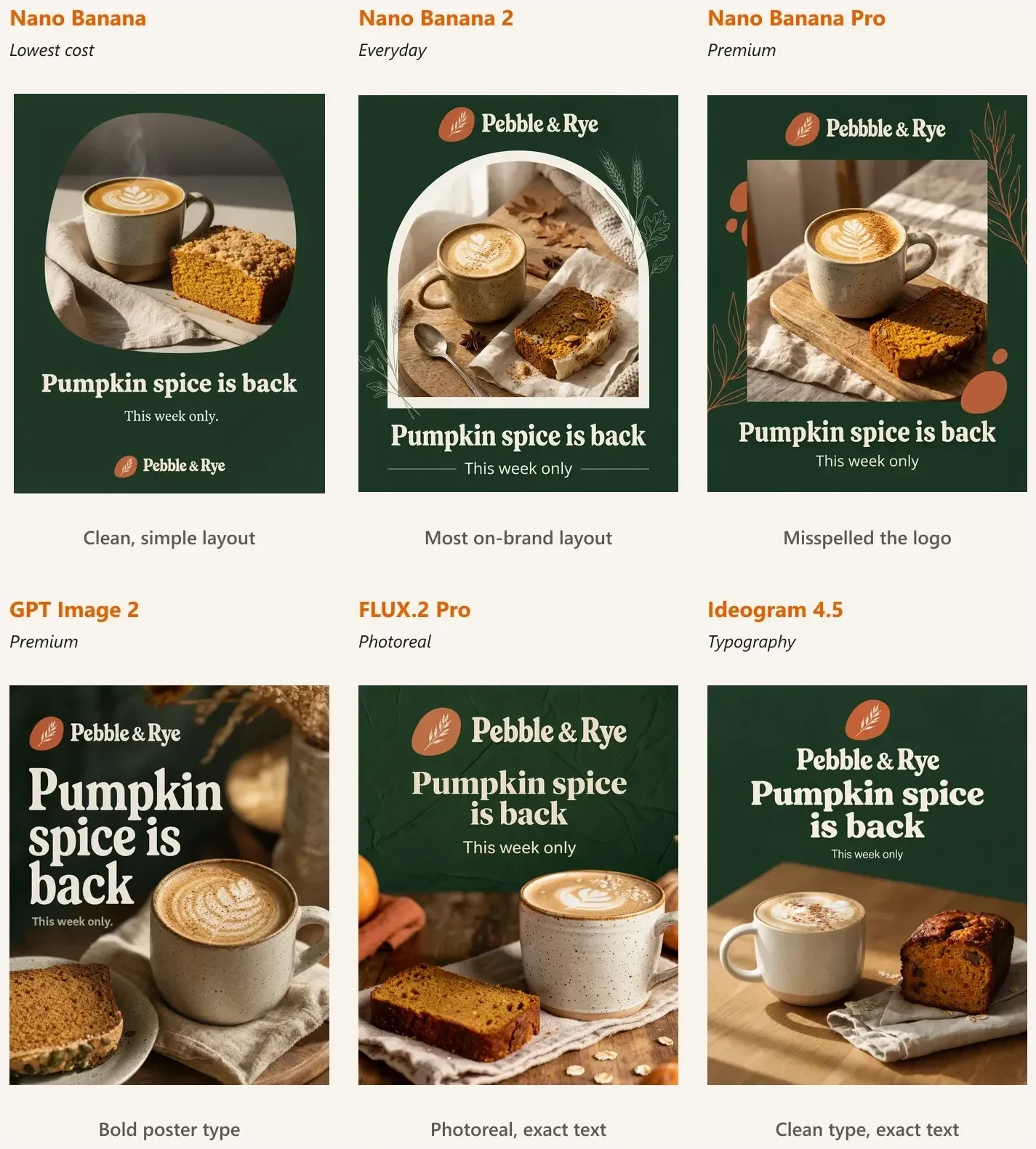
What we saw:
- All six were on brand. The green background, terracotta logo and cream type came through every time.
- Nano Banana 2 gave the most on-brand layout, including the arch frame from our brand image.
- GPT Image 2 went for a bold poster look with a very large headline.
Related articles
- How do I add a logo or product photo to my prompt?Click the paperclip in the prompt bar and attach one image, like a product photo or your logo. BrandGen keeps what the image shows and builds the scene from your prompt. Real before and after inside.Generating & refining - 4 min read
- How do I generate and refine images?Write better prompts, choose the right model, generate multiple variants, and refine any image into a new version - all from the BrandGen canvas.