Black Friday creatives that still look like your brand

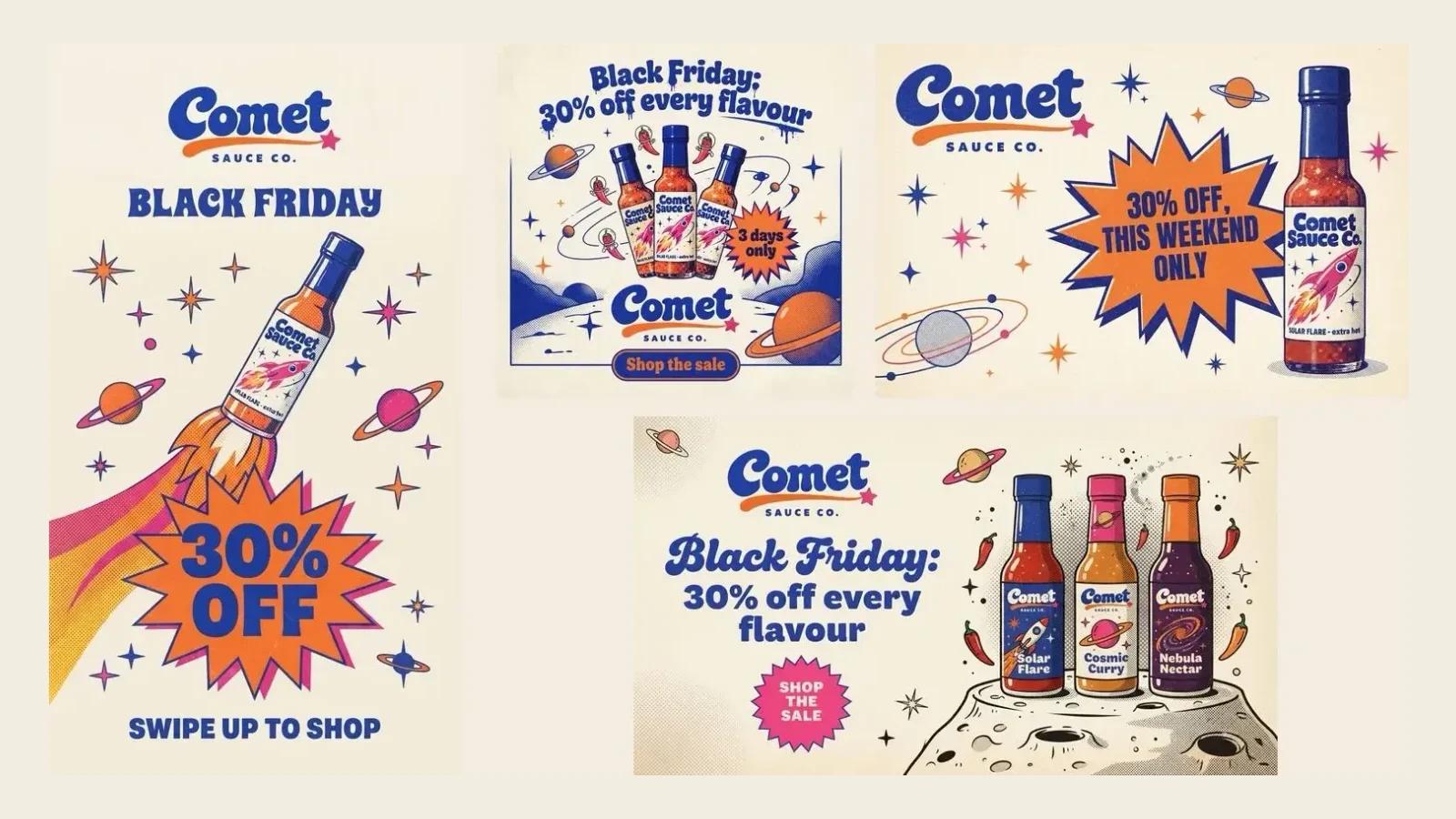
To make Black Friday creatives that still look like your brand, start from one image that already looks like you, keep the colours, type and illustration style fixed, and change only the offer. In BrandGen that means one brand image, one short prompt per format, and every format reads as the same shop having a sale.
This guide walks through a real run: one invented brand, four formats, the exact prompts, and what went wrong along the way.
Key takeaways
- A sale is a message change, not a style change. Keep the visual identity and put the offer inside it.
- One past ad, a logo and one product photo were enough input for a four-format campaign set in our test.
- Short prompts work: describe the offer and the format, and let the brand reference carry the style.
- Check every word. In our run, three of nine on-brand images needed a redo because of a typo or an off-brand font.
- Attach every product you want to show, or the model may invent new ones.
Why do Black Friday ads stop looking like the brand?
Because the offer takes over the design. Sale templates, stock "deal" styling and tool defaults push out the colours, type and illustration style that made the brand recognisable in the first place.
We saw this in our own test. With the brand reference switched off, the same prompt produced a glossy, photoreal post with gold 3D lettering and no logo. It is a decent sale ad, but not one a Comet Sauce Co. customer would recognise.
 Output with Brand DNA switched off. Same prompt as the feed post further down.
What should stay the same, and what should change?
Keep everything people recognise you by, and change only the offer.
- Keep: logo, colour palette, typefaces, illustration or photo style, recurring shapes, tone of voice.
- Change: the headline (the offer), dates, the call to action and the format size.
- Optional: an urgency badge, drawn in your own style and colours rather than a stock "sale" sticker.
Our example brand, Comet Sauce Co., is an invented small-batch hot sauce shop with a retro space-age look: cream paper, cobalt, tangerine and hot pink, halftone print texture, starbursts and ringed planets. Its Black Friday set has to look like that too.
What do you need before you start?
Three files most small brands already have:
- One past ad that shows the brand at its best. This becomes the brand reference.
- Your logo on a plain background.
- A clean photo of each product you want in the sale creatives.
 Input. The poster is the brand reference, the logo is uploaded once, and the bottle photo is attached to each prompt.
The reference does most of the work, so pick a typical post that shows your real colours, type and style, not a one-off experiment.
How do you turn one brand image into a full campaign set?
Set the brand up once, then make each format with a short prompt.
1. Create a project from your brand image. In BrandGen, start a new project with Brand image and upload the past ad. Reading the brand takes about a minute.
2. Check the Brand DNA. BrandGen turns the image into editable Brand DNA: identity, visual rules, colours and font roles. For our poster it picked up the halftone print texture, the starburst badges and the space-age shapes, plus four colours with approximate hex values.
 Real screenshot of the Brand DNA colours extracted from the poster.
3. Add your logo if asked. When the logo in the image is too small or busy to rebuild cleanly, BrandGen says so and asks you to upload it. Once uploaded, every generation uses it.
4. Attach the product and write the offer. Attach the product photo in the prompt bar, pick the aspect ratio, and describe only the offer and the layout. None of our prompts mention colours, fonts or textures.
Make the vertical formats count. Adobe reported that mobile drove 52.8% of US online sales from November 1 to December 1, 2025 (Adobe), so the story is not an afterthought.
What does the finished set look like?
 Output, feed post, 1:1. Prompt: "Black Friday sale post for the attached sauce. Headline "Black Friday: 30% off every flavour". Sticker "3 days only". Button "Shop the sale". Use the brand logo."
 Output, story, 9:16. Prompt: "Instagram story for the same Black Friday sale. The attached bottle large, blasting off like a rocket, "30% off" huge, "Black Friday" above it, "Swipe up to shop" at the bottom. Leave the top 250 px clear. Use the brand logo."
 Output, homepage banner, 16:9. Prompt: "Homepage hero banner for the Black Friday sale. Three sauce bottles on the right, text on the left: "Black Friday: 30% off every flavour", button "Shop the sale". Use the brand logo." Two of these three flavours were invented by the model; more on that below.
 Output, email header, 3:2. Prompt: "Email header for the Black Friday sale. Brand logo top left, the attached bottle on the right, one line "30% off, this weekend only"."
In our testing, all four kept the cream paper, the cobalt, tangerine and pink palette, the halftone texture and the starburst badges from the reference, and each placed the real logo without being told what it looks like. Each format took under a minute to generate.
What went wrong, and how do you catch it?
Two things needed fixing in our run, and both are easy to catch if you look.
Typos in big text. Of nine on-brand images, two banners had a spelling slip ("fvery flavour" and "every every flavour") and one set the headline in a plain black font that is not the brand's. All three were the wide banner, which carries the most text on one line. We regenerated it and the next one was clean.
Invented products. We asked for "three sauce bottles" but attached a photo of only one, so the model made up two flavours that do not exist. If you sell three, attach three. If you sell one, ask for one bottle.
The checklist we now use:
- Put the exact offer in quotes in the prompt, and keep it short: a headline, one line, one button.
- Read every word on every format before it goes out, including prices and dates.
- Regenerate only the format that is wrong; the others stay as they are.
- Keep fine print (terms, exclusions) in the caption or email body, not in the image.
When should you make your Black Friday creatives?
Early. Black Friday 2026 falls on Friday 27 November, and in BCG's 2025 Black Friday consumer study, nearly 60% of consumers planned to start researching deals in October or early November (BCG). Your creatives need to be ready when they start looking.
Make the whole set in one sitting from the same inputs, so the teaser, launch and last-day posts all match. For the last day, change only the headline, for example "Last day: 30% off".
Got any questions left?
Try it
Make your own sale set on the BrandGen homepage. Browse real outputs in the gallery, see use cases by industry, and compare plans on pricing.
Make your Black Friday creatives on brand
Stories, posts, email headers and banners from one prompt, all in your brand style.
Keep reading
- Why does AI keep getting your logo and text wrong?Why AI image tools redraw your logo, invent product labels, misspell headlines and make up small print, with real wrong-versus-right tests and the one change that fixed each.7 min read
- On-brand social media graphics with AI: a weekly workflowA one-hour weekly workflow for on-brand social media graphics with AI: set up your brand once, plan six posts, write prompts that get the text right, then proof and fix.6 min read
- AI product photos for small brands: one look across your whole catalogueHow a small shop can turn mismatched phone photos into a catalogue that looks like one brand, with real before and after results from BrandGen and the marketplace rules to check first.7 min read