On-brand social media graphics with AI: a weekly workflow

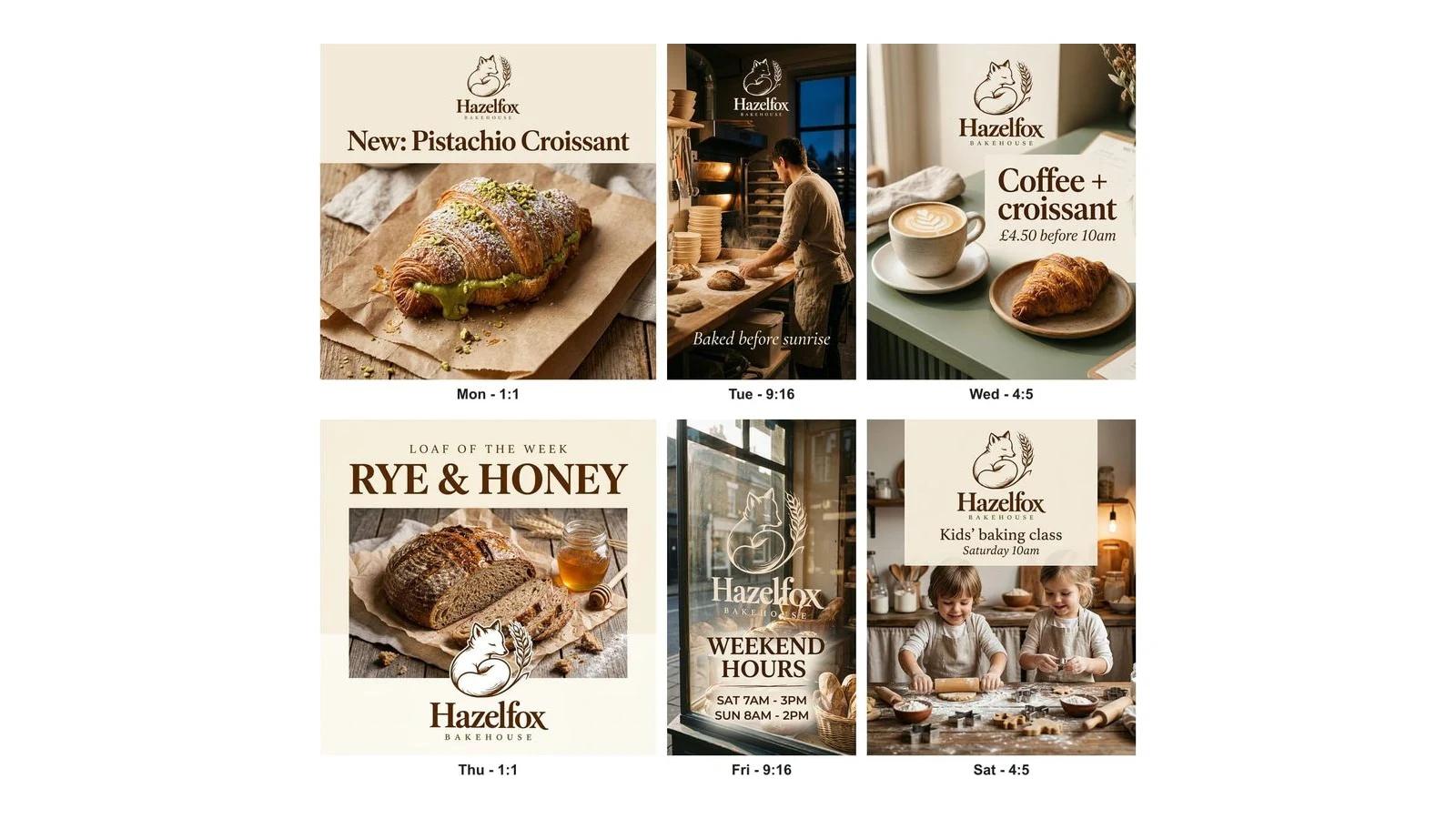
To make a week of on-brand social graphics with AI, set up your brand once, plan one post per day, and write each prompt with the exact words in quotes, then proofread before you post. We ran this workflow for an invented bakery in BrandGen: six posts in three sizes, every requested word spelled right, and the logo on all six without asking.
Most "AI for social media" advice stops at the prompt. The hard part is not one good image. It is the seventh image looking like it came from the same brand as the first. This guide walks through the weekly routine we use, with the real prompts and the real results.
Key takeaways
- Set up your brand once, from one reference image, and every post that week inherits its colours, type and logo.
- Plan the week as six jobs (new product, behind the scenes, offer, feature, hours, event), not six ideas.
- Put every word that must appear in quotes, and say "No other text". In our run, all 11 requested lines came out spelled correctly.
- Expect small style drift, such as capitals you did not ask for, and proofread every post at full size before it goes out.
- Make feed posts in 1:1 or 4:5 and stories in 9:16, in the same session, so the week stays one set.
What does a weekly on-brand workflow look like?
It is four steps, done once a week: set up the brand, plan the posts, generate them, then proof and fix. The brand setup only happens the first week. After that, a week of graphics is about an hour of planning and checking.
We tested it on Hazelfox Bakehouse, an invented neighbourhood bakery with a cream, hazelnut-brown and sage palette, a serif wordmark and a line-drawn fox curled around a stalk of wheat. Every post used the same model (Nano Banana 2.1) on its default settings, one image per prompt.
How do you set up your brand once?
Give BrandGen one brand image and let it build your Brand DNA: the written description of your logo, colours, type and style that every prompt then reuses. A packaging photo, a past post or a brand sheet all work. Pick the one that shows your logo, colours and type most clearly.
For Hazelfox we uploaded a single brand poster. BrandGen read the name, the serif wordmark, the fox-and-wheat mark and the palette, and rebuilt the logo as a clean file. While Brand DNA is switched on, that logo is used automatically, which is why it appears on every post below even though no prompt asked for it.
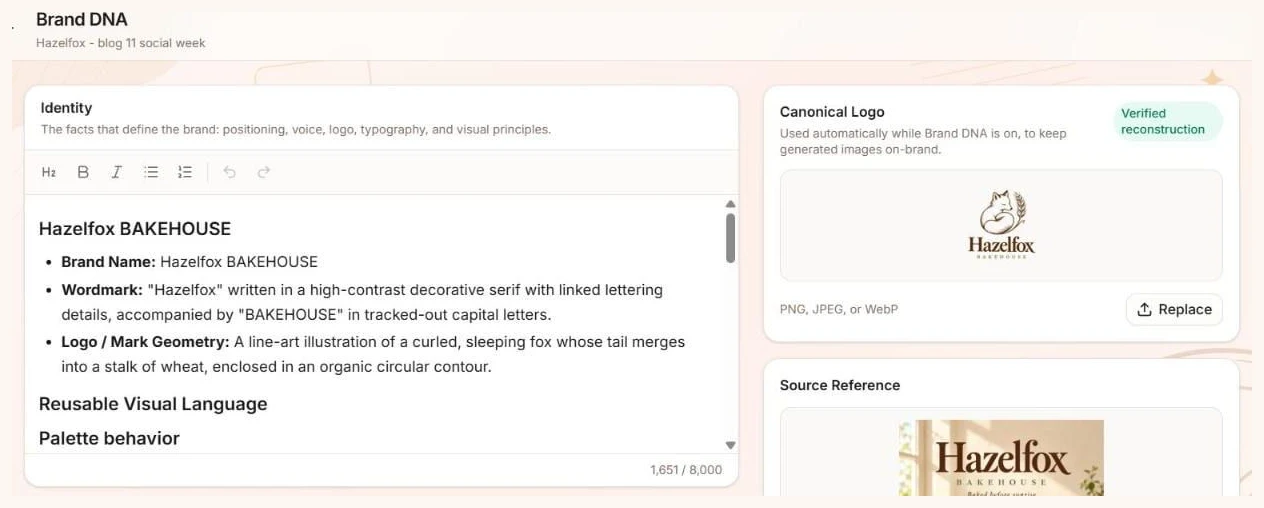
Read the Brand DNA before you generate anything. If it gets your name, colours or fonts wrong, fix the text there once, rather than repeating corrections in every prompt for the rest of the year.
How do you plan a week of posts?
Plan the week as jobs, not ideas: each day gets one clear purpose and the exact words it needs. Six jobs cover most small businesses, and they repeat every week with new details:
- Mon - New product (1:1): what is new, with its name.
- Tue - Behind the scenes (9:16 story): a person, a process, one short line.
- Wed - Offer (4:5): the deal and the price.
- Thu - Feature (1:1): this week's hero product.
- Fri - Hours or news (9:16 story): practical information people screenshot.
- Sat - Event (4:5): what, when, who it is for.
Write the copy before you open any tool. Short lines render best: every line in our week was six words or fewer.
How do you write prompts that get the text right?
Describe the scene, then give every word that must appear in quotes, then end with "No other text". That last line stops models from inventing a tagline or a fake label, the most common way an AI social post gives itself away.
Here are three of the six prompts we used, word for word:
- Mon: An Instagram post for Hazelfox Bakehouse announcing a new pastry. A single pistachio croissant, golden and flaky with a green pistachio cream filling, on a kraft paper bag. Headline: "New: Pistachio Croissant". No other text.
- Wed: An Instagram post for Hazelfox Bakehouse promoting a weekday breakfast offer. A flat white in a ceramic cup next to a butter croissant on a sage-green counter. Headline: "Coffee + croissant". Line under it: "£4.50 before 10am". No other text.
- Fri: An Instagram story for Hazelfox Bakehouse announcing weekend opening hours. The bakery shopfront window with bread on display in morning light. Headline: "Weekend hours". Two lines under it: "Sat 7am-3pm" and "Sun 8am-2pm". No other text.
Notice what the prompts leave out: colours, fonts and the logo. Brand DNA already carries those. The prompt only says what is different about this one post.
Which sizes should you make for each platform?
Make feed posts in 1:1 or 4:5 and stories in 9:16. Instagram keeps a feed photo at full quality when its shape is between 1.91:1 and 3:4, so both square and 4:5 fit, and it crops anything outside that range (Instagram Help Center). For stories, Meta recommends 9:16 to fill the full-screen vertical format (Meta Business Help Center).
Pick the size in BrandGen before you generate, rather than cropping afterwards. The model then lays out the text for that shape instead of having it cut off later: our two stories stacked the logo at the top and the words below, using the full height.
How do you check and fix the posts?
Proofread every post at full size, word by word, against your copy. In our week, all 11 requested lines were spelled correctly, from "New: Pistachio Croissant" to "£4.50 before 10am". The logo and palette were consistent across all six.
Two posts changed how the text was set, though not what it said:
- Thu set "Loaf of the week" and "Rye & Honey" in capitals.
- Fri set the hours as "SAT 7AM - 3PM", in capitals with spaces around the dash.
Neither is wrong, but if your style guide says sentence case, it is worth fixing. In BrandGen, open the image and type a one-line refine such as "Change only the headline to sentence case. Keep everything else exactly the same." Fix one thing per refine, so you can see what changed.
Also check the props. Our Wednesday post put a menu card in the background with blurred, unreadable lines. It is out of focus, so it passes, but a sharp fake menu would not.
How long does a week of posts take?
In our run, generation took minutes. Planning and proofreading took most of the hour. Each post took about 16 to 30 seconds to generate once it started.
The time goes into the parts AI cannot do for you: deciding what the week is about, writing six short lines of copy, and checking every word. That is also where the quality comes from. A weekly routine works because the brand setup is already done, so each week starts at Step 2.
Got any questions left?
Try it
Set up your brand once on the BrandGen homepage and make your first week of posts. See how other teams use it on BrandGen for social media, browse real outputs in the gallery, compare plans on the pricing page, or read what Brand DNA is.
Make a week of on-brand social graphics in one sitting
Set up your Brand DNA once, then every post, story and banner comes out in the same style.
Keep reading
- AI product photos for small brands: one look across your whole catalogueHow a small shop can turn mismatched phone photos into a catalogue that looks like one brand, with real before and after results from BrandGen and the marketplace rules to check first.7 min read
- Turn your website into on-brand images: Brand DNA from one URLPaste your homepage URL and BrandGen learns your colours, fonts, logo and voice, so every AI image it generates stays on brand.6 min read
- Brand guidelines for AI image generation: what to include (+ copy-paste template)Why normal brand guidelines fail with AI image tools, the ten things AI-ready guidelines need, a copy-paste template, and real side-by-side results from vague versus detailed guidelines.7 min read