Why does AI keep getting your logo and text wrong?

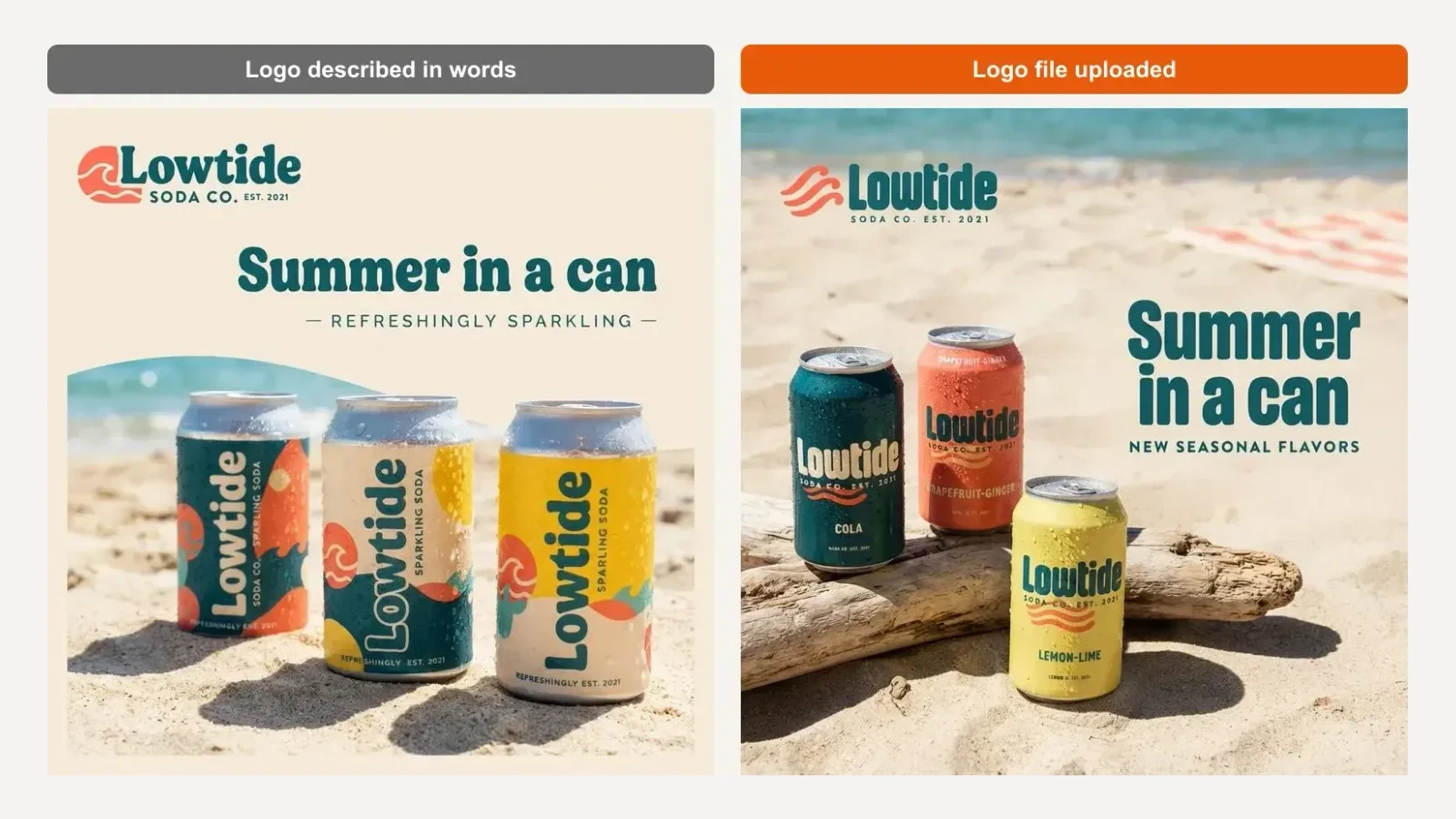
AI image models get your logo and text wrong because they redraw everything from scratch: anything they have not been given as a file or as exact words, they approximate. Upload the real logo, attach the real product, put every word you want in quotes, keep it short, and read every line before you post.
Below are real tests from one invented brand, each with the single change that fixed it.
Key takeaways
- A logo described in words gets redrawn. A logo uploaded as a file gets used.
- Without a product photo, the model invents your packaging, flavours and all.
- If you do not give it the words, the model often writes its own slogan.
- Headlines were the safest text in our tests. Small print and facts you never supplied were the riskiest.
- Never let an AI image carry facts like ingredients, nutrition or prices you have not checked.
Why does AI get my logo wrong?
Because it draws your logo instead of placing it. An image model has no copy of your logo file unless you give it one, so it builds something that matches your description and your name.
We set up an invented soda brand, Lowtide, in BrandGen with written brand guidelines that described the logo in detail: a chunky rounded wordmark, a coral wave emblem, "SODA CO. EST. 2021" underneath. Then we asked for an Instagram post "with our logo top left".
 Input. The real logo file and one real product photo.
The first image, before we uploaded the file, has a logo that looks plausible and is wrong: a different wave inside a circle, different lettering, and three can designs we never made. After we uploaded the logo on the Brand DNA page and ran the same prompt, the real logo appeared, three waves and all.
Google's own guidance for its image models points the same way: when editing an image, describe "critical details (like a face or logo)" in great detail so they are preserved (Google AI for Developers, updated 2026-09-23). The most detailed thing you can give it is the file.
Why does my product label come out different?
For the same reason: no photo, no label. Ask for "our Yuzu Fizz can" without attaching it and the model guesses what the can looks like.
 Prompt: "Product shot of our Yuzu Fizz can on a beach towel in the sun."
In our testing, the guessed can was the right yellow and even carried the uploaded logo, but "YUZU FIZZ", the tagline and the fruit artwork were gone. With the phone photo attached, all of them came back. In BrandGen each prompt takes one attached image, picked from up to five saved in the project, so show one product per image.
Look at the top of both images too: we asked for no text, and the model wrote its own slogans, "Easy-going refreshment" and "Taste the sunshine". Even when we did give a headline, one image added a line of its own ("New seasonal flavors"). Read every line, including the ones you did not ask for.
Why is the text on my image misspelled?
Usually because there is a lot of it, or it is small. Every letter is drawn as part of the picture, so more letters means more chances to slip.
 From our Black Friday test: two wide banners with a long headline, two typos.
In a Black Friday test we ran for another brand, two of nine images had a spelling slip, both on wide banners with the most text in one line. So we expected a 17-word headline to break here too. It did not: the model spelled all 17 words right. It did push the product down and turn the post into a wall of text, though, which is its own problem.
 Left: "Our brand new sparkling yuzu soda is finally here and in every store near you this weekend". Right: "Yuzu Fizz is here" plus one small line.
Keep headlines to a handful of words, put them in quotes, and leave longer copy for the caption.
Does the model matter for text?
Less than you might think for short text, more for dense text. Google describes its Nano Banana Pro model as "the best model for creating images with correctly rendered and legible text" (Google, November 20, 2025), and BrandGen's model picker labels it "Flagship detail, sharpest text".
But in our test the cheaper Nano Banana 2 Lite got a four-line menu board completely right: every flavour, every price, the real logo.
 Nano Banana 2 Lite, four short lines of text: all correct.
Start with the cheaper model for short headlines and lists. Switch to a text-focused model when the image carries a lot of small text, and check it either way.
What is the most dangerous mistake?
Small print the model makes up. We asked for the back of the can, "showing the full ingredients list and a nutrition facts panel", and gave it nothing to copy.
 Nothing on this label came from us.
It looks completely real: 110 calories, 26 g of sugar, an ingredients list, a barcode. Every number is invented, and the footnote even misspells "nutrient" as "nubient". For a food, drink or cosmetics brand, an image like this on a product page is a real risk. If an image needs facts, put the real ones in the prompt and check every digit, or keep them out of the image entirely.
Which prompt words make it worse?
Words that tell the model to remove text. In an earlier test we ended a product prompt with "No text, no logo overlay" to stop the model adding a headline. It obeyed, and wiped the brand name off the product's own label too.
 The label band is blank because the prompt said "no logo overlay".
Say what to keep instead: "Keep the product and its label exactly as in the attached photo, including the logo and all label text." In our next run, that one line brought the logo back.
What should you check before you post?
- Logo: is it your real file, the right colours, not stretched or redrawn?
- Every word: read the headline letter by letter, then every small line.
- Extra text: any slogan, date or claim you did not ask for?
- Product: right flavour, name, colour and pack size?
- Facts: prices, dates, ingredients and claims are yours and correct, or not in the image at all.
Got any questions left?
Try it
Upload your real logo and one product photo on BrandGen, and check every word before you post. Read what Brand DNA is, browse real outputs in the gallery, see use cases by industry, and compare plans on pricing.
Get your real logo into AI images
Attach your logo file instead of describing it, and Brand DNA keeps your colours and style.
Keep reading
- Black Friday creatives that still look like your brandHow a small online brand can make a full Black Friday set (feed post, story, banner, email header) with AI in BrandGen, without losing the look customers know.7 min read
- On-brand social media graphics with AI: a weekly workflowA one-hour weekly workflow for on-brand social media graphics with AI: set up your brand once, plan six posts, write prompts that get the text right, then proof and fix.6 min read
- AI product photos for small brands: one look across your whole catalogueHow a small shop can turn mismatched phone photos into a catalogue that looks like one brand, with real before and after results from BrandGen and the marketplace rules to check first.7 min read