Nano Banana vs Nano Banana Pro: when is Pro worth it?

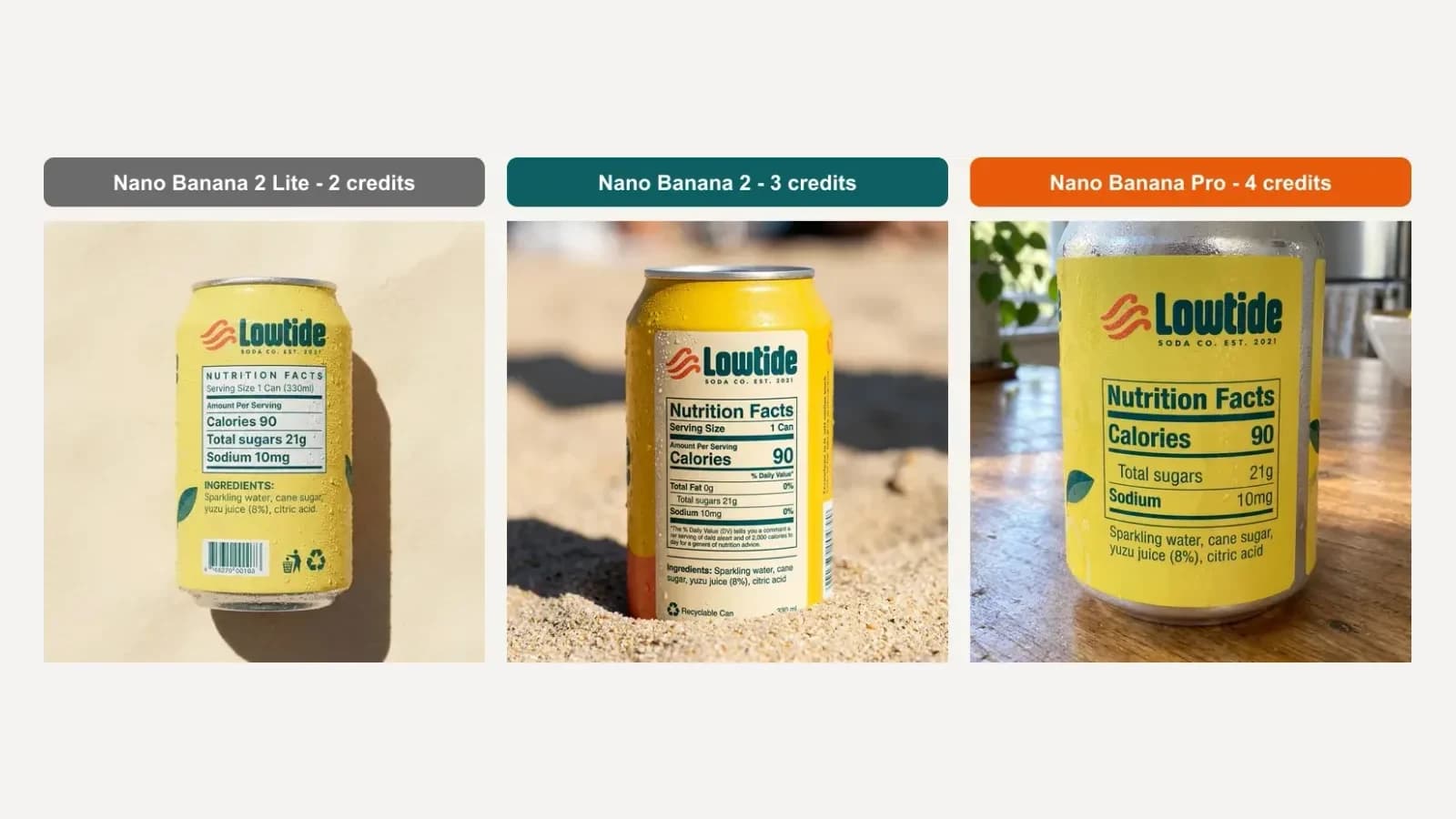
Nano Banana Pro is worth it when an image has to carry exact small text with nothing made up, such as a label, a nutrition panel or fine print. For everyday posts, product shots and short headlines, Nano Banana 2 Lite and Nano Banana 2 matched it in our tests for half to three quarters of the cost.
We ran the same five prompts for one brand on all three models in BrandGen and checked every word at full size.
Key takeaways
- In BrandGen, Nano Banana 2 Lite costs 2 credits per image, Nano Banana 2 costs 3 and Nano Banana Pro costs 4.
- All three spelled our headlines right, including a dense poster and a two-language poster.
- Pro was the only model that rendered our small print exactly and added nothing.
- The cheaper models were likelier to add text we did not ask for.
- Pro is not automatically "better": it once switched a photo brief to an illustration.
What is the difference between the three models?
They are three of Google's Gemini image models, from fastest and cheapest to most capable.
- Nano Banana 2 Lite is Google's "fastest, most cost-efficient Gemini Image model", built for work "where speed and cost are the primary constraints" (Google, June 30, 2026).
- Nano Banana 2 brings "the advanced world knowledge, quality and reasoning you love in Nano Banana Pro, at lightning-fast speed" (Google, February 26, 2026). BrandGen's model picker calls it "Everyday on-brand work, flash speed".
- Nano Banana Pro is, in Google's words, "the best model for creating images with correctly rendered and legible text" (Google, November 20, 2025). BrandGen's picker calls it "Flagship detail, sharpest text".
In BrandGen they cost 2, 3 and 4 credits per image, and your Brand DNA applies to all three.
How did we test them?
We used one invented soda brand, Lowtide, with its logo uploaded and a photo of its Yuzu Fizz can saved in the project. Then we ran five prompts on each model with nothing else changed: same Brand DNA, same attachment, square format, one image each. No re-rolls.
 Our scorecard. Clean results: Lite 2 of 5, Nano Banana 2 3 of 5, Pro 3 of 5.
Which model handles dense text best?
All three. We asked for a poster with a headline and three lines of event details, and every model spelled every word right.
 Prompt: a poster with "Lowtide Summer Session", "Saturday 14 June, 4pm till late", "Free can of Yuzu Fizz with every ticket", "DJs, sunset, sea swims".
The surprise was Pro's style. Our brand guidelines ask for real photography, and Pro drew an illustrated poster instead. It looks good, but it is not on brand.
The two-language test went the same way: "Summer in a can" and "El verano en lata", with a line in each language, came out right on all three. The Lite version then copied the lines onto the can as well, with typos ("Yozu Fizz, now in storse").
 English and Spanish on one poster. Main text right on all three.
Which model gets small print right?
Pro, clearly. We asked for the back of the can with a nutrition panel and an ingredients line, and supplied the exact facts: "Calories 90", "Total sugars 21g", "Sodium 10mg", "Sparkling water, cane sugar, yuzu juice (8%), citric acid".
- Nano Banana 2 Lite got our facts right but added a barcode we never gave it.
- Nano Banana 2 got our facts right but added a "Total Fat 0g" row and a garbled footnote ("tellls you a commant a rer serving of dald aleart").
- Nano Banana Pro showed exactly our facts, large and legible, and nothing else.
That is the image at the top of this post. If an image carries fine print that has to be exact, Pro is the one to use, and you should still check every digit.
Do the cheaper models handle products and people?
For a single product, yes. A close-up of the can in a hand came out with the correct label on all three models.
 Prompt: "Close-up of the attached can held in a hand with sun-kissed skin, condensation on the metal, label facing the camera."
With three people and several cans in one scene, every model slipped somewhere. Lite added its own headline ("Golden hour sips") and drew cans in flavours we do not sell. Nano Banana 2 redrew the cans as tall, slim ones. Pro kept the real yellow can, but the tiny label text on the small cans was garbled.
 Busy scenes with small products are hard for every model. Check them closely.
When is Nano Banana Pro worth it?
Use Pro when:
- The image carries small text that must be exact: labels, nutrition or ingredient panels, terms, menus with fine print.
- You want nothing added: no invented slogans, barcodes or extra rows.
- The image will be printed large, or zoomed in on a product page.
Use Nano Banana 2 Lite or Nano Banana 2 when:
- The image is a social post, banner or product shot with a short headline.
- You are exploring ideas and will pick one to finish later.
- You need volume: Pro costs twice as much as Lite per image.
A cheap way to work: try ideas on Lite, then run the one you like on Pro if it carries fine print.
Which plan do you need for each model?
- Free: Nano Banana 2 Lite, with 30 credits once.
- Basic ($7 a month, 100 credits): adds Nano Banana 2.
- Pro ($17 a month, 300 credits): all models, including Nano Banana Pro.
- Max ($55 a month, 1,000 credits): everything in Pro, plus 4K output on Nano Banana 2 and Nano Banana Pro.
At 4 credits per image, the Pro plan's 300 monthly credits cover 75 Nano Banana Pro images, or 150 on Lite. See pricing for the full comparison.
Got any questions left?
Try it
Run your own prompt on two models side by side in BrandGen and compare. Read what Brand DNA is, browse the gallery, and compare plans on pricing.
Compare Nano Banana models on your own brand
Run the same prompt through each model in one BrandGen project and pick the one that fits.
Keep reading
- On-brand social media graphics with AI: a weekly workflowA one-hour weekly workflow for on-brand social media graphics with AI: set up your brand once, plan six posts, write prompts that get the text right, then proof and fix.6 min read
- AI product photos for small brands: one look across your whole catalogueHow a small shop can turn mismatched phone photos into a catalogue that looks like one brand, with real before and after results from BrandGen and the marketplace rules to check first.7 min read
- Turn your website into on-brand images: Brand DNA from one URLPaste your homepage URL and BrandGen learns your colours, fonts, logo and voice, so every AI image it generates stays on brand.6 min read